
Setup: pfSense and DNS over TLS
pfSense is an open-source firewall, used in both consumer and commercial environments.
pfSense has dedicated documentation for DNS over TLS, which we recommend reviewing in addition to this article.
pfSense utilizes Unbound, which has built-in DNS over TLS support, with the configuration being accessible in the GUI.
Before making changes to a production environment, we recommend taking a backup of the existing configuration.
Step 1
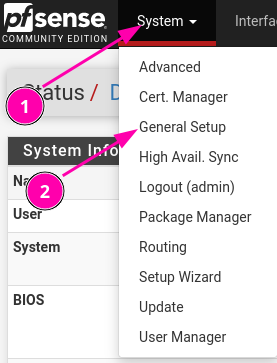
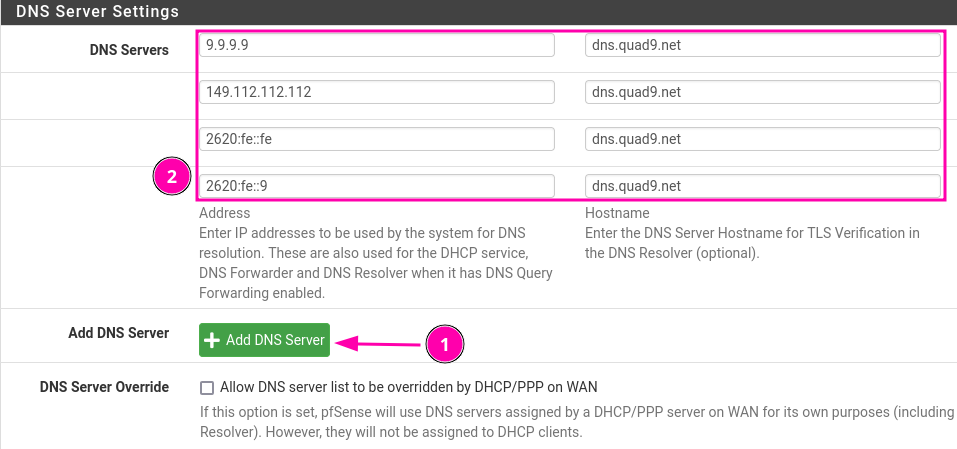
- Click "Add DNS Server" until there are 4 rows of entries available.
- Add the Quad9 IPv4 and IPv6 addresses on the left fields:
9.9.9.9
149.112.112.112
2620:fe::fe
2620:fe::9 - Add dns.quad9.net on all the Hostname fields on the right.
If your network does not have IPv6, which you can test here, then IPv6 addresses should not be added, as it may result in a percentage of your DNS requests failing.
- Click "Save" at the bottom of the screen.
Step 2
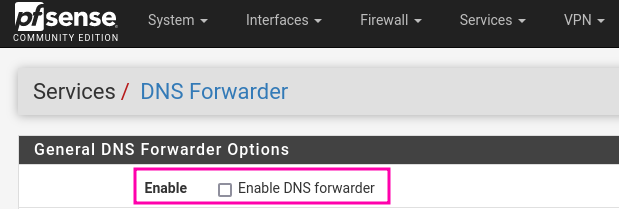
- Navigate to Services -> DNS Forwarder on the top menu. Make sure Enable DNS forwarder is disabled. If it is enabled, disable it, and click Save at the bottom of the page.
Step 3
- Navigate to Services -> DNS Resolver on the top menu.
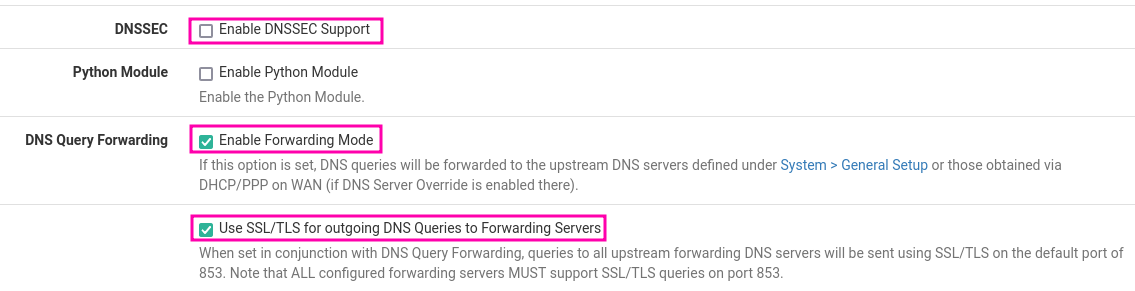
- Scroll down until you find the section seen in the following screenshot.
- Disable Enable DNSSEC Support if enabled.
- DNSSEC is already enforced by Quad9, and enabling DNSSEC at the forwarder level can cause false DNSSEC failures.
- Enable DNS Query Forwarding
- Enable Use SSL/TLS for outgoing DNS queries to Forwarding Servers
- Click Save at the bottom of the screen.
- Click Apply Changes near the top of the screen to apply the saved changes.
Step 4
You can confirm that pfSense is now sending your queries via DNS over TLS using the built-in Packet Capture Tool.
You can also run a test from a macOS, Linux, or Windows system on the network.
No comments to display
No comments to display