
How To Find My Public IP Address From Linux CLI
Introduction
How do I find out my public IP address on the Linux and OS X Unix command line to use with my own bash shell script without using third party web site? Is there command-line option which will show my dynamic IP address on a Ubuntu or Fedora Linux?
There are many ways to find out your public IP address or wan (Wide Area Network) IP on a Linux or Unix-like operating systems such as FreeBSD, OpenBSD, NetBSD, Apple OS X, and others. This page explain how to find out your own IP address using command line options on an Ubuntu, Debian, CentOS Linux, macOS/OS X and Unix bash shell.
|-------------------|----------------------------|
| Difficulty Level | Easy |
| Root Privileges | No |
| Requirements | Linux or Unix terminal |
| Category | Linux Shell Scripting |
| OS Compatibility | BSD • Linux • macOS • Unix |
| Est. Reading Time | 4 Minutes |
Explain IP addresses
An IP is short for Internet Protocol. It is used to identify computers or mobile devices on the Internet. Each device connected to the Internet has an IP address. IP address can be used to personalize information.
Using WGET
wget -q -O - http://whatismyip.akamai.comUse dig command for determining my public IP address Linux:
- Open the Terminal application on Linux, macOS or Unix.
- Type the following dig (domain information groper) command on a Linux, OS X, or Unix-like operating systems to see your own public IP address assigned by the ISP:
dig +short myip.opendns.com @resolver1.opendns.com- You can also type:
dig TXT +short o-o.myaddr.l.google.com @ns1.google.com- Get external IP address in a shell using Cloudflare:
dig +short txt ch whoami.cloudflare @1.0.0.1- Show your public IPv6 on Linux:
dig -6 TXT +short o-o.myaddr.l.google.com @ns1.google.com- You should see your IP address on screen. This is the fastest way to find out your IP address without using 3rd party site.
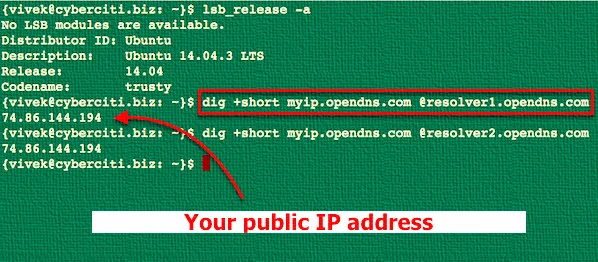
Fig.01: Use dig command to find your IP address
You can try host command to see the same information:
host myip.opendns.com resolver1.opendns.comWe can also use the Google DNS server to get the same info using [dig command](https://www.cyberciti.biz/faq/linux-unix-dig-command-examples-usage-syntax/
dig TXT +short o-o.myaddr.l.google.com @ns1.google.com | awk -F'"' '{ print $2}'How do I store my IP address in a shell variable?
The syntax is as follows to assign output to variable named myip and print it using the echo command/printf command. For example:
myip="$(dig +short myip.opendns.com @resolver1.opendns.com)"
echo "My WAN/Public IP address: ${myip}"
Sample outputs:
My WAN/Public IP address: 74.86.144.194Finding Public/WAN IP address on a router
A few ADSL/Cable router allows you to login to your router using telnet command or ssh command:
telnet your-router-ip-here
ssh user@your-router-ip-here
telnet 192.168.0.254
ssh admin@192.168.1.254
ifconfig eth1 | grep 'inet'
ip addr show nas01
On my routers pppoe0 interface is used for FTTH or ADSL2/VDSL. For example, the following command will get you the IP address for your machine or router running on pfSense:
ifconfig pppoe0Sample outputs (look for inet and inet6):
pppoe0: flags=88d1<UP,POINTOPOINT,RUNNING,NOARP,SIMPLEX,MULTICAST> metric 0 mtu 1492
    description: TATA
    inet6 fe80::208:a2ff:fe0d:540%pppoe0 prefixlen 64 scopeid 0xd
    inet 181.151.101.72 --> 181.151.99.1 netmask 0xffffffff
    nd6 options=21<PERFORMNUD,AUTO_LINKLOCAL>
Use 3rd party web-sites to get your IP at shell prompt
Please note that I do not recommend following curl/wget method due to security or privacy reasons. You have been warned. The syntax for the curl command is as follows:
curl checkip.amazonaws.com
curl ifconfig.me
curl icanhazip.com
curl ipecho.net/plain
curl ifconfig.co
## store output in $server_ip ##
server_ip="$(curl ifconfig.co)"
## Display it ##
printf "Server public ip4 %s\n" $server_ip
Not a fan of CLI?
Use your own web-browser. Visit the following urls to see your WAN IP address:
Summing up
You learned simple commands and other utilities to find your public IPv4 or IPv6 address assigned by your ISP or mobile phone company from Linux, macOS, or Unix desktop without using 3rd party websites. For more information see the dig command or host command help pages using the man command:
man dig
man host
This entry is 2 of 2 in the Find IP Address Tutorial series. Keep reading the rest of the series:
How to find Public IP address AWS EC2 or Lightsail VM
Find My Public IP Address From Command Line On a Linux
About the author: Vivek Gite is the founder of nixCraft, the oldest running blog about Linux and open source. He wrote more than 7k+ posts and helped numerous readers to master IT topics. Join the nixCraft community via RSS Feed or Email Newsletter.