Remove vSAN Datastore Without vCenter
- Run the following command to list the vSAN datastore
esxcli vsan cluster list-
Copy the Sub-Cluster UUID as shown below.
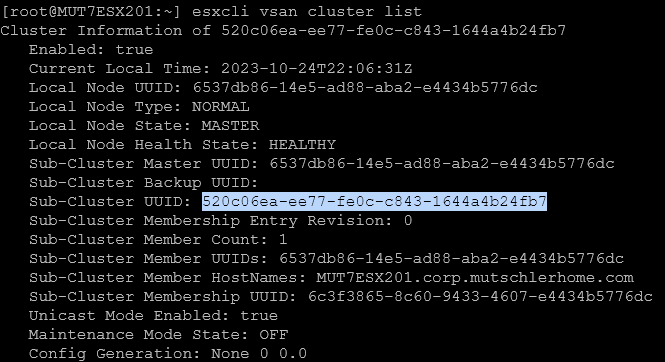
-
Run the following command and paste the Sub-Cluster UUID at the end, that you grabbed from the previous step.
esxcli vsan cluster leave -u 520c06ea-ee77-fe0c-c843-1644a4b24fb7- Verify you only see the disks that were a part of the vSAN using the following command.
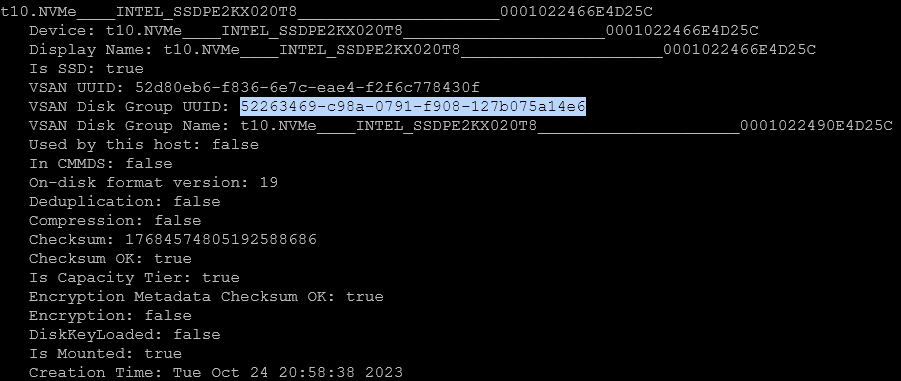
esxcli vsan storage list- Copy the VSAN Disk Group UUID from one of the disks listed in the previous step, and run the following command with that UUID appended to the end.
esxcli vsan storage remove -u 52263469-c98a-0791-f908-127b075a14e6- Ensure the list is clear by running the following command.
esxcli vsan storage list