| Pros |
Cons |
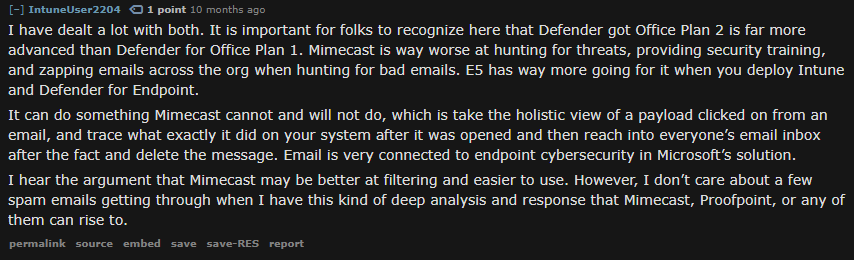
| End to end XDR and traces including giving a holistic view of payloads clicked from an email. Can utilize this to then remove messages from user inboxes. |
Steep learning curve. Will need training for new and existing staff to implement and manage. |
| All in one solution for XDR. |
Many tasks are only able to be done using Powershell. This results in time wasted if you don't know Powershell well and/or need to look up commands. It also adds challenge to training new staff and existing since they also need to learn Powershell as well. |
|
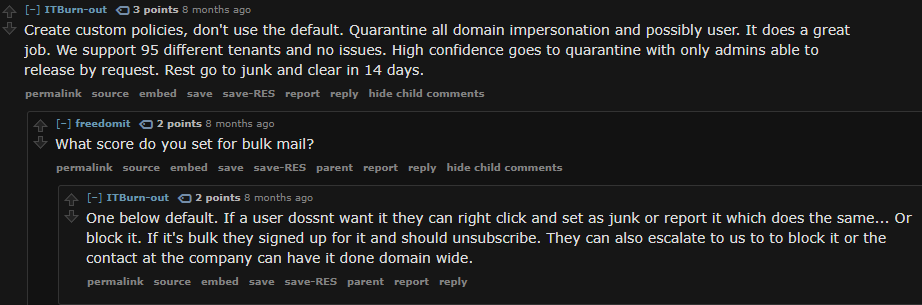
"High Confidence" phishing and spam is auto blocked by Microsoft with little ability for admins to control or manage this. There is no "white list" for these emails and the only way to "force" them to get delivered is by submitting them to Microsoft every 30 days until they white list them on their back end. |
|
More difficult to learn how to effectively use than Mimecast. |
|
Poor or outdated documentation. Difficult to find help for basic tasks or general setup. |
|
No specific "Graymail" filtering. Using the sliders Microsoft provides can quickly create false positives at higher levels of filtering. |
|
Requires significant setup and understanding of M365, Defender, Azure, Mail Flow. |
|
Much more complex and confusing interface requiring access to at least four different admin panels to manage and maintain (M365/Exchange/Security/Compliance). |
|
Not optimized or configured "out of the box". |