Active Directory - Scripts
- AD Health Check With Email
- Compare Two Azure/AD/M365 Groups and Print the Results
- Create daily scheduled task for AD snapshots
- Disable DNS Debug Logging
- Get DNS Diagnostics
- Get List of All Attributes in AD
- Get User SID
- Get USERID From SID
- Get-ADUserPasswordNeverExpires
- Get-UserAccountControl for Specific Machine
- List Active Directory Users In Groups
- Test gMSA Account on DCs
- Get-AllDisabledandInactiveComputers
- Count-AllDomainControllers
- Count-MembersInADGroupNested
AD Health Check With Email
<#PSScriptInfo

.VERSION 1.0

.GUID 30c7c087-1268-4d21-8bf7-ee25c37459b0

.AUTHOR Vikas Sukhija

.COMPANYNAME TechWizard.cloud

.COPYRIGHT

.TAGS

.LICENSEURI

.PROJECTURI https://techwizard.cloud/2021/05/04/active-directory-health-check-v2/

.ICONURI

.EXTERNALMODULEDEPENDENCIES

.REQUIREDSCRIPTS

.EXTERNALSCRIPTDEPENDENCIES

.RELEASENOTES https://techwizard.cloud/2021/05/04/active-directory-health-check-v2/


.PRIVATEDATA

#>

<#

.DESCRIPTION
    Date: 12/25/2014
    AD Health Status
    Satus: Ping,Netlogon,NTDS,DNS,DCdiag Test(Replication,sysvol,Services)
    Update: Added Advertising
    Update: 5/3/2021 version2 with parameters to make it more generic

#>
###############################Paramters####################################
param (
  [string]$Smtphost = "FULL EMAIL SERVER",
  [string]$SMTPPort = "25",
  [string]$from = "EMAIL ADDRESS",
  [string]$To = "EMAIL ADDRESS",
  [string]$Attachment = "C:\Program Files\WindowsPowerShell\Scripts\ADReport.htm",
  [string]$Subject = "Domain Report",
  [String[]]$EmailReport = "EMAIL ADDRESS",
  $timeout = "120"
)
###########################Define Variables##################################
$EmailReport = $EmailReport -split ','
$report = ".\ADReport.htm"

if((test-path $report) -like $false)
{
new-item $report -type file
}
#####################################Get ALL DC Servers#######################
$getForest = [system.directoryservices.activedirectory.Forest]::GetCurrentForest()

$DCServers = $getForest.domains | ForEach-Object {$_.DomainControllers} | ForEach-Object {$_.Name}

###############################HTml Report Content############################
Clear-Content $report
Add-Content $report "<html>"
Add-Content $report "<head>"
Add-Content $report "<meta http-equiv='Content-Type' content='text/html; charset=iso-8859-1'>"
Add-Content $report '<title>AD Status Report</title>'
add-content $report '<STYLE TYPE="text/css">'
add-content $report  "<!--"
add-content $report  "td {"
add-content $report  "font-family: Tahoma;"
add-content $report  "font-size: 11px;"
add-content $report  "border-top: 1px solid #999999;"
add-content $report  "border-right: 1px solid #999999;"
add-content $report  "border-bottom: 1px solid #999999;"
add-content $report  "border-left: 1px solid #999999;"
add-content $report  "padding-top: 0px;"
add-content $report  "padding-right: 0px;"
add-content $report  "padding-bottom: 0px;"
add-content $report  "padding-left: 0px;"
add-content $report  "}"
add-content $report  "body {"
add-content $report  "margin-left: 5px;"
add-content $report  "margin-top: 5px;"
add-content $report  "margin-right: 0px;"
add-content $report  "margin-bottom: 10px;"
add-content $report  ""
add-content $report  "table {"
add-content $report  "border: thin solid #000000;"
add-content $report  "}"
add-content $report  "-->"
add-content $report  "</style>"
Add-Content $report "</head>"
Add-Content $report "<body>"
add-content $report  "<table width='100%'>"
add-content $report  "<tr bgcolor='Lavender'>"
add-content $report  "<td colspan='7' height='25' align='center'>"
add-content $report  "<font face='tahoma' color='#003399' size='4'><strong>Active Directory Health Check</strong></font>"
add-content $report  "</td>"
add-content $report  "</tr>"
add-content $report  "</table>"

add-content $report  "<table width='100%'>"
Add-Content $report  "<tr bgcolor='IndianRed'>"
Add-Content $report  "<td width='5%' align='center'><B>Identity</B></td>"
Add-Content $report  "<td width='10%' align='center'><B>PingSTatus</B></td>"
Add-Content $report  "<td width='10%' align='center'><B>NetlogonService</B></td>"
Add-Content $report  "<td width='10%' align='center'><B>NTDSService</B></td>"
Add-Content $report  "<td width='10%' align='center'><B>DNSServiceStatus</B></td>"
Add-Content $report  "<td width='10%' align='center'><B>NetlogonsTest</B></td>"
Add-Content $report  "<td width='10%' align='center'><B>ReplicationTest</B></td>"
Add-Content $report  "<td width='10%' align='center'><B>ServicesTest</B></td>"
Add-Content $report  "<td width='10%' align='center'><B>AdvertisingTest</B></td>"
Add-Content $report  "<td width='10%' align='center'><B>FSMOCheckTest</B></td>"

Add-Content $report "</tr>"

################Ping Test################################################################
foreach ($DC in $DCServers){
$Identity = $DC
                Add-Content $report "<tr>"
if ( Test-Connection -ComputerName $DC -Count 1 -ErrorAction SilentlyContinue ) {
Write-Host $DC `t $DC `t Ping Success -ForegroundColor Green

        Add-Content $report "<td bgcolor= 'GainsBoro' align=center>  <B> $Identity</B></td>"
                Add-Content $report "<td bgcolor= 'Aquamarine' align=center>  <B>Success</B></td>"

                ##############Netlogon Service Status################
        $serviceStatus = start-job -scriptblock {get-service -ComputerName $($args[0]) -Name "Netlogon" -ErrorAction SilentlyContinue} -ArgumentList $DC
                wait-job $serviceStatus -timeout $timeout
                if($serviceStatus.state -like "Running")
                {
                 Write-Host $DC `t Netlogon Service TimeOut -ForegroundColor Yellow
                 Add-Content $report "<td bgcolor= 'Yellow' align=center><B>NetlogonTimeout</B></td>"
                 stop-job $serviceStatus
                }
                else
                {
                $serviceStatus1 = Receive-job $serviceStatus
                 if ($serviceStatus1.status -eq "Running") {
        Write-Host $DC `t $serviceStatus1.name `t $serviceStatus1.status -ForegroundColor Green
              $svcName = $serviceStatus1.name
              $svcState = $serviceStatus1.status
              Add-Content $report "<td bgcolor= 'Aquamarine' align=center><B>$svcState</B></td>"
                  }
                 else
                  {
             Write-Host $DC `t $serviceStatus1.name `t $serviceStatus1.status -ForegroundColor Red
             $svcName = $serviceStatus1.name
             $svcState = $serviceStatus1.status
             Add-Content $report "<td bgcolor= 'Red' align=center><B>$svcState</B></td>"
                  }
                }
               ######################################################
                ##############NTDS Service Status################
        $serviceStatus = start-job -scriptblock {get-service -ComputerName $($args[0]) -Name "NTDS" -ErrorAction SilentlyContinue} -ArgumentList $DC
                wait-job $serviceStatus -timeout $timeout
                if($serviceStatus.state -like "Running")
                {
                 Write-Host $DC `t NTDS Service TimeOut -ForegroundColor Yellow
                 Add-Content $report "<td bgcolor= 'Yellow' align=center><B>NTDSTimeout</B></td>"
                 stop-job $serviceStatus
                }
                else
                {
                $serviceStatus1 = Receive-job $serviceStatus
                 if ($serviceStatus1.status -eq "Running") {
        Write-Host $DC `t $serviceStatus1.name `t $serviceStatus1.status -ForegroundColor Green
              $svcName = $serviceStatus1.name
              $svcState = $serviceStatus1.status
              Add-Content $report "<td bgcolor= 'Aquamarine' align=center><B>$svcState</B></td>"
                  }
                 else
                  {
             Write-Host $DC `t $serviceStatus1.name `t $serviceStatus1.status -ForegroundColor Red
             $svcName = $serviceStatus1.name
             $svcState = $serviceStatus1.status
             Add-Content $report "<td bgcolor= 'Red' align=center><B>$svcState</B></td>"
                  }
                }
               ######################################################
                ##############DNS Service Status################
        $serviceStatus = start-job -scriptblock {get-service -ComputerName $($args[0]) -Name "DNS" -ErrorAction SilentlyContinue} -ArgumentList $DC
                wait-job $serviceStatus -timeout $timeout
                if($serviceStatus.state -like "Running")
                {
                 Write-Host $DC `t DNS Server Service TimeOut -ForegroundColor Yellow
                 Add-Content $report "<td bgcolor= 'Yellow' align=center><B>DNSTimeout</B></td>"
                 stop-job $serviceStatus
                }
                else
                {
                $serviceStatus1 = Receive-job $serviceStatus
                 if ($serviceStatus1.status -eq "Running") {
        Write-Host $DC `t $serviceStatus1.name `t $serviceStatus1.status -ForegroundColor Green
              $svcName = $serviceStatus1.name
              $svcState = $serviceStatus1.status
              Add-Content $report "<td bgcolor= 'Aquamarine' align=center><B>$svcState</B></td>"
                  }
                 else
                  {
             Write-Host $DC `t $serviceStatus1.name `t $serviceStatus1.status -ForegroundColor Red
             $svcName = $serviceStatus1.name
             $svcState = $serviceStatus1.status
             Add-Content $report "<td bgcolor= 'Red' align=center><B>$svcState</B></td>"
                  }
                }
               ######################################################
               ####################Netlogons status##################
               add-type -AssemblyName microsoft.visualbasic
               $cmp = "microsoft.visualbasic.strings" -as [type]
               $sysvol = start-job -scriptblock {dcdiag /test:netlogons /s:$($args[0])} -ArgumentList $DC
               wait-job $sysvol -timeout $timeout
               if($sysvol.state -like "Running")
               {
               Write-Host $DC `t Netlogons Test TimeOut -ForegroundColor Yellow
               Add-Content $report "<td bgcolor= 'Yellow' align=center><B>NetlogonsTimeout</B></td>"
               stop-job $sysvol
               }
               else
               {
               $sysvol1 = Receive-job $sysvol
               if($cmp::instr($sysvol1, "passed test NetLogons"))
                  {
                  Write-Host $DC `t Netlogons Test passed -ForegroundColor Green
                  Add-Content $report "<td bgcolor= 'Aquamarine' align=center><B>NetlogonsPassed</B></td>"
                  }
               else
                  {
                  Write-Host $DC `t Netlogons Test Failed -ForegroundColor Red
                  Add-Content $report "<td bgcolor= 'Red' align=center><B>NetlogonsFail</B></td>"
                  }
                }
               ########################################################
               ####################Replications status##################
               add-type -AssemblyName microsoft.visualbasic
               $cmp = "microsoft.visualbasic.strings" -as [type]
               $sysvol = start-job -scriptblock {dcdiag /test:Replications /s:$($args[0])} -ArgumentList $DC
               wait-job $sysvol -timeout $timeout
               if($sysvol.state -like "Running")
               {
               Write-Host $DC `t Replications Test TimeOut -ForegroundColor Yellow
               Add-Content $report "<td bgcolor= 'Yellow' align=center><B>ReplicationsTimeout</B></td>"
               stop-job $sysvol
               }
               else
               {
               $sysvol1 = Receive-job $sysvol
               if($cmp::instr($sysvol1, "passed test Replications"))
                  {
                  Write-Host $DC `t Replications Test passed -ForegroundColor Green
                  Add-Content $report "<td bgcolor= 'Aquamarine' align=center><B>ReplicationsPassed</B></td>"
                  }
               else
                  {
                  Write-Host $DC `t Replications Test Failed -ForegroundColor Red
                  Add-Content $report "<td bgcolor= 'Red' align=center><B>ReplicationsFail</B></td>"
                  }
                }
               ########################################################
                 ####################Services status##################
               add-type -AssemblyName microsoft.visualbasic
               $cmp = "microsoft.visualbasic.strings" -as [type]
               $sysvol = start-job -scriptblock {dcdiag /test:Services /s:$($args[0])} -ArgumentList $DC
               wait-job $sysvol -timeout $timeout
               if($sysvol.state -like "Running")
               {
               Write-Host $DC `t Services Test TimeOut -ForegroundColor Yellow
               Add-Content $report "<td bgcolor= 'Yellow' align=center><B>ServicesTimeout</B></td>"
               stop-job $sysvol
               }
               else
               {
               $sysvol1 = Receive-job $sysvol
               if($cmp::instr($sysvol1, "passed test Services"))
                  {
                  Write-Host $DC `t Services Test passed -ForegroundColor Green
                  Add-Content $report "<td bgcolor= 'Aquamarine' align=center><B>ServicesPassed</B></td>"
                  }
               else
                  {
                  Write-Host $DC `t Services Test Failed -ForegroundColor Red
                  Add-Content $report "<td bgcolor= 'Red' align=center><B>ServicesFail</B></td>"
                  }
                }
               ########################################################
                 ####################Advertising status##################
               add-type -AssemblyName microsoft.visualbasic
               $cmp = "microsoft.visualbasic.strings" -as [type]
               $sysvol = start-job -scriptblock {dcdiag /test:Advertising /s:$($args[0])} -ArgumentList $DC
               wait-job $sysvol -timeout $timeout
               if($sysvol.state -like "Running")
               {
               Write-Host $DC `t Advertising Test TimeOut -ForegroundColor Yellow
               Add-Content $report "<td bgcolor= 'Yellow' align=center><B>AdvertisingTimeout</B></td>"
               stop-job $sysvol
               }
               else
               {
               $sysvol1 = Receive-job $sysvol
               if($cmp::instr($sysvol1, "passed test Advertising"))
                  {
                  Write-Host $DC `t Advertising Test passed -ForegroundColor Green
                  Add-Content $report "<td bgcolor= 'Aquamarine' align=center><B>AdvertisingPassed</B></td>"
                  }
               else
                  {
                  Write-Host $DC `t Advertising Test Failed -ForegroundColor Red
                  Add-Content $report "<td bgcolor= 'Red' align=center><B>AdvertisingFail</B></td>"
                  }
                }
               ########################################################
                 ####################FSMOCheck status##################
               add-type -AssemblyName microsoft.visualbasic
               $cmp = "microsoft.visualbasic.strings" -as [type]
               $sysvol = start-job -scriptblock {dcdiag /test:FSMOCheck /s:$($args[0])} -ArgumentList $DC
               wait-job $sysvol -timeout $timeout
               if($sysvol.state -like "Running")
               {
               Write-Host $DC `t FSMOCheck Test TimeOut -ForegroundColor Yellow
               Add-Content $report "<td bgcolor= 'Yellow' align=center><B>FSMOCheckTimeout</B></td>"
               stop-job $sysvol
               }
               else
               {
               $sysvol1 = Receive-job $sysvol
               if($cmp::instr($sysvol1, "passed test FsmoCheck"))
                  {
                  Write-Host $DC `t FSMOCheck Test passed -ForegroundColor Green
                  Add-Content $report "<td bgcolor= 'Aquamarine' align=center><B>FSMOCheckPassed</B></td>"
                  }
               else
                  {
                  Write-Host $DC `t FSMOCheck Test Failed -ForegroundColor Red
                  Add-Content $report "<td bgcolor= 'Red' align=center><B>FSMOCheckFail</B></td>"
                  }
                }
               ########################################################

}
else
              {
Write-Host $DC `t $DC `t Ping Fail -ForegroundColor Red
        Add-Content $report "<td bgcolor= 'GainsBoro' align=center>  <B> $Identity</B></td>"
    Add-Content $report "<td bgcolor= 'Red' align=center>  <B>Ping Fail</B></td>"
        Add-Content $report "<td bgcolor= 'Red' align=center>  <B>Ping Fail</B></td>"
        Add-Content $report "<td bgcolor= 'Red' align=center>  <B>Ping Fail</B></td>"
        Add-Content $report "<td bgcolor= 'Red' align=center>  <B>Ping Fail</B></td>"
        Add-Content $report "<td bgcolor= 'Red' align=center>  <B>Ping Fail</B></td>"
        Add-Content $report "<td bgcolor= 'Red' align=center>  <B>Ping Fail</B></td>"
        Add-Content $report "<td bgcolor= 'Red' align=center>  <B>Ping Fail</B></td>"
        Add-Content $report "<td bgcolor= 'Red' align=center>  <B>Ping Fail</B></td>"
        Add-Content $report "<td bgcolor= 'Red' align=center>  <B>Ping Fail</B></td>"
}

}

Add-Content $report "</tr>"
############################################Close HTMl Tables###########################
Add-content $report  "</table>"
Add-Content $report "</body>"
Add-Content $report "</html>"

########################################################################################
#############################################Send Email#################################

if(($Smtphost) -and ($EmailReport) -and ($from)){
[string]$body = Get-Content $report
Send-MailMessage -SmtpServer $Smtphost -port $SMTPPort -UseSsl ` -Attachments $Attachment -From $from -To $EmailReport -Subject "Active Directory Health Monitor for $($Env:COMPUTERNAME) at $(Get-Date -Format g)" -Body $body -BodyAsHtml
}
####################################EnD#################################################
########################################################################################
Compare Two Azure/AD/M365 Groups and Print the Results
Compare two AD Groups.
$GROUP1=Get-ADGroupMember -Identity "Domain Admins" | select-Object Name
$GROUP2=Get-ADGroupMember -Identity "Enterprise Admins" | select-Object Name

$Comparison=Compare-Object -ReferenceObject $GROUP1.Name -DifferenceObject $GROUP2.Name | Sort-Object Name

foreach ($i in $Comparison){
	if($i.SideIndicator -eq "=>"){
		#Listed in GROUP2 but not in GROUP1
		Write-output "$($i.InputObject) exists in Group 2 but not Group 1"
	}elseif($i.SideIndicator -eq "<="){
		#Listed in GROUP1 but not in GROUP2
		Write-output "$($i.InputObject) exists in Group 1 but not Group 2"
	}
}
Compare two Azure groups.
Connect-AzureAD

$GROUP1=Get-AzureADGroupMember -ObjectId "c203a90f-0ec1-4c75-85c9-8d6e97f78a60" -All $true | Select-Object DisplayName, UserPrincipalName
$GROUP2=Get-AzureADGroupMember -ObjectId "2177ea60-e8d6-4dc9-a044-4a1ccecbf743" -All $true | Select-Object DisplayName, UserPrincipalName

$Comparison=Compare-Object -ReferenceObject $GROUP1.UserPrincipalName -DifferenceObject $GROUP2.UserPrincipalName | Sort-Object UserPrincipalName

foreach ($i in $Comparison){
	if($i.SideIndicator -eq "=>"){
		#Listed in Group 2 but not in Group 1
		Write-output "$($i.InputObject) exists in Group 2 but not Group 1"
	}elseif($i.SideIndicator -eq "<="){
		#Listed in Group 1 but not in Group 2
		Write-output "$($i.InputObject) exists in Group 1 but not Group 2"
	}
}
Compare two Distribution Lists.
Connect-AzureAD

$GROUP1=Get-DistributionGroupMember -Identity "iPhone Notifications" | Select-Object Identity, PrimarySMTPAddress
$GROUP2=Get-DistributionGroupMember -Identity "iPhone Notifications" | Select-Object Identity, PrimarySMTPAddress

$Comparison=Compare-Object -ReferenceObject $GROUP1.PrimarySMTPAddress -DifferenceObject $GROUP2.PrimarySMTPAddress | Sort-Object PrimarySMTPAddress

foreach ($i in $Comparison){
	if($i.SideIndicator -eq "=>"){
		#Listed in Group 2 but not in Group 1
		Write-output "$($i.InputObject) exists in Group 2 but not Group 1"
	}elseif($i.SideIndicator -eq "<="){
		#Listed in Group 1 but not in Group 2
		Write-output "$($i.InputObject) exists in Group 1 but not Group 2"
	}
}
Create daily scheduled task for AD snapshots
#region Check if System is DC and logged-on user is admin

$DomainRole = Get-WmiObject -Class Win32_ComputerSystem | Select-Object -ExpandProperty DomainRole

if( $DomainRole -match '4|5' )
#0=StandaloneWorkstation, 1=MemberWorkstation, 2=StandaloneServer, 3=MemberServer, 4=BackupDC, 5=PrimaryDC

{Write-Host 'Check: Machine is DC' -ForegroundColor Green}

else
{Write-Host 'Oops: This Script must be run on a DC' -ForegroundColor Red -InformationAction Stop}

if (([Security.Principal.WindowsPrincipal] [Security.Principal.WindowsIdentity]::GetCurrent()).IsInRole([Security.Principal.WindowsBuiltInRole]::Administrator))

{Write-Host 'Check: You are Admin and good to go...' -ForegroundColor Green
}
else
{Write-Host 'Oops: Please run Powershell as Administrator to complete this task!' -ForegroundColor Red
}
#endregion


#region Create Scheduled Task
#&: call operator; tells PowerShell to interpret the string that follows as an executable command
$action = New-ScheduledTaskAction -Execute 'powershell.exe' -Argument {-noexit -command (&"ntdsutil.exe 'activate instance ntds' snapshot create quit quit")}
$trigger = New-ScheduledTaskTrigger -Daily -At 03:00
$principal = New-ScheduledTaskPrincipal -UserId 'NT Authority\System' -LogonType Password

Register-ScheduledTask -TaskName ADSnapshot -Action $action -Trigger $trigger -Principal $principal
#endregion
Disable DNS Debug Logging
# GUI Script to disable DNS debug logging on multiple domain controllers
# -----------------------------------------------------------

Add-Type -AssemblyName System.Windows.Forms
Add-Type -AssemblyName System.Drawing

# Enable DPI awareness to improve scaling
[System.Windows.Forms.Application]::EnableVisualStyles()

# Use this for better DPI scaling
Add-Type -TypeDefinition @"
using System;
using System.Runtime.InteropServices;

public class DpiAwareness {
    [DllImport("user32.dll")]
    public static extern bool SetProcessDPIAware();
}
"@
[DpiAwareness]::SetProcessDPIAware()

# Create the main form with AutoScaleMode
$form = New-Object System.Windows.Forms.Form
$form.Text = "DNS Debug Logging Manager"
$form.ClientSize = New-Object System.Drawing.Size(600, 500)
$form.StartPosition = "CenterScreen"
$form.FormBorderStyle = "Sizable"
$form.MinimumSize = New-Object System.Drawing.Size(600, 500)
$form.MaximizeBox = $true
$form.MinimizeBox = $true
$form.Font = New-Object System.Drawing.Font("Segoe UI", 9)
$form.AutoScaleMode = [System.Windows.Forms.AutoScaleMode]::Dpi

# Create a TableLayoutPanel for better layout control
$tableLayoutPanel = New-Object System.Windows.Forms.TableLayoutPanel
$tableLayoutPanel.Dock = [System.Windows.Forms.DockStyle]::Fill
$tableLayoutPanel.RowCount = 6
$tableLayoutPanel.ColumnCount = 1
$tableLayoutPanel.Padding = New-Object System.Windows.Forms.Padding(10)
$tableLayoutPanel.ColumnStyles.Add((New-Object System.Windows.Forms.ColumnStyle([System.Windows.Forms.SizeType]::Percent, 100)))

# Row styles - control proportions
$tableLayoutPanel.RowStyles.Add((New-Object System.Windows.Forms.RowStyle([System.Windows.Forms.SizeType]::Absolute, 30))) # Title
$tableLayoutPanel.RowStyles.Add((New-Object System.Windows.Forms.RowStyle([System.Windows.Forms.SizeType]::Absolute, 40))) # Instructions
$tableLayoutPanel.RowStyles.Add((New-Object System.Windows.Forms.RowStyle([System.Windows.Forms.SizeType]::Percent, 35))) # DC Textbox
$tableLayoutPanel.RowStyles.Add((New-Object System.Windows.Forms.RowStyle([System.Windows.Forms.SizeType]::Absolute, 30))) # Progress
$tableLayoutPanel.RowStyles.Add((New-Object System.Windows.Forms.RowStyle([System.Windows.Forms.SizeType]::Percent, 45))) # Log
$tableLayoutPanel.RowStyles.Add((New-Object System.Windows.Forms.RowStyle([System.Windows.Forms.SizeType]::Absolute, 50))) # Buttons

$form.Controls.Add($tableLayoutPanel)

# Create title label
$titleLabel = New-Object System.Windows.Forms.Label
$titleLabel.Text = "Disable DNS Debug Logging on Remote Domain Controllers"
$titleLabel.Font = New-Object System.Drawing.Font("Segoe UI", 12, [System.Drawing.FontStyle]::Bold)
$titleLabel.Dock = [System.Windows.Forms.DockStyle]::Fill
$titleLabel.AutoSize = $false
$tableLayoutPanel.Controls.Add($titleLabel, 0, 0)

# Create instructions label
$instructionsLabel = New-Object System.Windows.Forms.Label
$instructionsLabel.Text = "Enter domain controller names (one per line) or paste a list:"
$instructionsLabel.Dock = [System.Windows.Forms.DockStyle]::Fill
$instructionsLabel.AutoSize = $false
$tableLayoutPanel.Controls.Add($instructionsLabel, 0, 1)

# Create textbox for domain controllers
$dcTextBox = New-Object System.Windows.Forms.TextBox
$dcTextBox.Multiline = $true
$dcTextBox.ScrollBars = "Vertical"
$dcTextBox.AcceptsReturn = $true
$dcTextBox.WordWrap = $false
$dcTextBox.Dock = [System.Windows.Forms.DockStyle]::Fill
$dcTextBox.Anchor = [System.Windows.Forms.AnchorStyles]::Top -bor [System.Windows.Forms.AnchorStyles]::Bottom -bor [System.Windows.Forms.AnchorStyles]::Left -bor [System.Windows.Forms.AnchorStyles]::Right
$tableLayoutPanel.Controls.Add($dcTextBox, 0, 2)

# Create progress panel
$progressPanel = New-Object System.Windows.Forms.Panel
$progressPanel.Dock = [System.Windows.Forms.DockStyle]::Fill
$tableLayoutPanel.Controls.Add($progressPanel, 0, 3)

# Create progress bar
$progressBar = New-Object System.Windows.Forms.ProgressBar
$progressBar.Dock = [System.Windows.Forms.DockStyle]::Fill
$progressBar.Style = "Continuous"
$progressPanel.Controls.Add($progressBar)

# Create a RichTextBox for logs
$logTextBox = New-Object System.Windows.Forms.RichTextBox
$logTextBox.ReadOnly = $true
$logTextBox.BackColor = [System.Drawing.Color]::White
$logTextBox.Font = New-Object System.Drawing.Font("Consolas", 9)
$logTextBox.Dock = [System.Windows.Forms.DockStyle]::Fill
$logTextBox.Anchor = [System.Windows.Forms.AnchorStyles]::Top -bor [System.Windows.Forms.AnchorStyles]::Bottom -bor [System.Windows.Forms.AnchorStyles]::Left -bor [System.Windows.Forms.AnchorStyles]::Right
$tableLayoutPanel.Controls.Add($logTextBox, 0, 4)

# Create button panel and flowLayoutPanel for buttons
$buttonPanel = New-Object System.Windows.Forms.Panel
$buttonPanel.Dock = [System.Windows.Forms.DockStyle]::Fill
$tableLayoutPanel.Controls.Add($buttonPanel, 0, 5)

# Create status label
$statusLabel = New-Object System.Windows.Forms.Label
$statusLabel.Text = "Ready"
$statusLabel.AutoSize = $true
$statusLabel.Location = New-Object System.Drawing.Point(0, 15)
$buttonPanel.Controls.Add($statusLabel)

# Create a FlowLayoutPanel for buttons
$buttonFlowPanel = New-Object System.Windows.Forms.FlowLayoutPanel
$buttonFlowPanel.FlowDirection = [System.Windows.Forms.FlowDirection]::RightToLeft
$buttonFlowPanel.WrapContents = $false
$buttonFlowPanel.AutoSize = $true
$buttonFlowPanel.Anchor = [System.Windows.Forms.AnchorStyles]::Right -bor [System.Windows.Forms.AnchorStyles]::Bottom
$buttonFlowPanel.Location = New-Object System.Drawing.Point(290, 10)
$buttonPanel.Controls.Add($buttonFlowPanel)

# Create buttons and add to flow panel
$executeButton = New-Object System.Windows.Forms.Button
$executeButton.Text = "Execute"
$executeButton.Size = New-Object System.Drawing.Size(100, 30)
$executeButton.BackColor = [System.Drawing.Color]::FromArgb(0, 120, 212)
$executeButton.ForeColor = [System.Drawing.Color]::White
$executeButton.FlatStyle = "Flat"
$buttonFlowPanel.Controls.Add($executeButton)

$importButton = New-Object System.Windows.Forms.Button
$importButton.Text = "Import List"
$importButton.Size = New-Object System.Drawing.Size(100, 30)
$importButton.BackColor = [System.Drawing.Color]::LightGray
$importButton.FlatStyle = "Flat"
$buttonFlowPanel.Controls.Add($importButton)

$exportButton = New-Object System.Windows.Forms.Button
$exportButton.Text = "Export Results"
$exportButton.Size = New-Object System.Drawing.Size(100, 30)
$exportButton.BackColor = [System.Drawing.Color]::LightGray
$exportButton.FlatStyle = "Flat"
$exportButton.Enabled = $false
$buttonFlowPanel.Controls.Add($exportButton)

# Update button positions on form resize
$form.Add_Resize({
    # Calculate position manually using integers to avoid subtraction method issues
    $xPos = $buttonPanel.Width
    $xPos -= $buttonFlowPanel.Width
    $xPos -= 10  # Add 10px margin
    $buttonFlowPanel.Location = New-Object System.Drawing.Point($xPos, 10)
})

# Function to log messages
function Log-Message {
    param (
        [string]$Message,
        [string]$Color = "Black"
    )

    # Convert string color to System.Drawing.Color
    $drawingColor = switch ($Color) {
        "Red"    { [System.Drawing.Color]::Red }
        "Green"  { [System.Drawing.Color]::Green }
        "Blue"   { [System.Drawing.Color]::Blue }
        "Black"  { [System.Drawing.Color]::Black }
        default  { [System.Drawing.Color]::Black }
    }

    # Append text with color
    $logTextBox.SelectionStart = $logTextBox.TextLength
    $logTextBox.SelectionLength = 0
    $logTextBox.SelectionColor = $drawingColor
    $logTextBox.AppendText("$(Get-Date -Format 'yyyy-MM-dd HH:mm:ss') - $Message`r`n")
    $logTextBox.SelectionStart = $logTextBox.TextLength
    $logTextBox.ScrollToCaret()

    # Update status label
    $statusLabel.Text = $Message
    [System.Windows.Forms.Application]::DoEvents()
}

# Function to disable DNS debug logging
function Disable-DnsDebugLogging {
    param (
        [Parameter(Mandatory=$true)]
        [string]$ServerName
    )

    try {
        Log-Message "Connecting to $ServerName..." "Blue"

        # Check if the server is reachable
        if (-not (Test-Connection -ComputerName $ServerName -Count 1 -Quiet)) {
            Log-Message "Cannot reach $ServerName. Skipping..." "Red"
            return $false
        }

        # Connect to remote DNS server and disable debug logging only
        $result = Invoke-Command -ComputerName $ServerName -ScriptBlock {
            try {
                # Get DNS Server service
                $dnsServer = Get-Service -Name "DNS" -ErrorAction Stop

                if ($dnsServer.Status -ne "Running") {
                    return "DNS Server service is not running on this server."
                }

                # Disable debug log settings via registry while preserving standard logging
                Set-ItemProperty "HKLM:\SYSTEM\CurrentControlSet\Services\DNS\Parameters" -Name "LogLevel" -Value 0 -ErrorAction Stop

                # Use dnscmd.exe if available to disable debug logging
                if (Get-Command dnscmd.exe -ErrorAction SilentlyContinue) {
                    & dnscmd.exe /config /LogLevel 0
                }

                                    # Check if DNS Server PowerShell module is available
                if (Get-Module -ListAvailable -Name DnsServer) {
                    # Use DNS Server cmdlets to disable debug logging
                    Import-Module DnsServer

                    # Use Set-DnsServerDiagnostics directly with parameters instead of InputObject
                    # This is more compatible across different PowerShell versions
                    try {
                        Set-DnsServerDiagnostics -Queries $false `
                                               -Answers $false `
                                               -Notifications $false `
                                               -Update $false `
                                               -QuestionTransactions $false `
                                               -UnmatchedResponse $false `
                                               -SendPackets $false `
                                               -ReceivePackets $false `
                                               -TcpPackets $false `
                                               -UdpPackets $false `
                                               -FullPackets $false `
                                               -FilterIPAddressList @() `
                                               -EnableLoggingToFile $false `
                                               -ErrorAction Stop
                    }
                    catch {
                        # Fallback for older versions with different parameter names
                        $diagnosticParams = @{
                            ErrorAction = 'SilentlyContinue'
                        }

                        # Try each parameter separately to handle different PowerShell versions
                        Set-DnsServerDiagnostics -Queries $false @diagnosticParams
                        Set-DnsServerDiagnostics -Answers $false @diagnosticParams
                        Set-DnsServerDiagnostics -Notifications $false @diagnosticParams
                        Set-DnsServerDiagnostics -Update $false @diagnosticParams
                        Set-DnsServerDiagnostics -QuestionTransactions $false @diagnosticParams
                        Set-DnsServerDiagnostics -UnmatchedResponse $false @diagnosticParams
                        Set-DnsServerDiagnostics -SendPackets $false @diagnosticParams
                        Set-DnsServerDiagnostics -ReceivePackets $false @diagnosticParams
                        Set-DnsServerDiagnostics -TcpPackets $false @diagnosticParams
                        Set-DnsServerDiagnostics -UdpPackets $false @diagnosticParams
                        Set-DnsServerDiagnostics -FullPackets $false @diagnosticParams
                        Set-DnsServerDiagnostics -EnableLoggingToFile $false @diagnosticParams
                    }
                }

                return "DNS debug logging successfully disabled while preserving standard event logging."
            }
            catch {
                return "Error: $_"
            }
        }

        # Output results
        $statusMessage = "$($ServerName): $result"
        if ($result -like "Error:*" -or $result -like "DNS Server service is not*") {
            Log-Message $statusMessage "Red"
            return $false
        } else {
            Log-Message $statusMessage "Green"
            return $true
        }
    }
    catch {
        Log-Message "Failed to connect to $ServerName. Error: $_" "Red"
        return $false
    }
}

# Results array to store outcomes
$script:results = @()

# Import button click event
$importButton.Add_Click({
    $openFileDialog = New-Object System.Windows.Forms.OpenFileDialog
    $openFileDialog.Filter = "Text files (*.txt)|*.txt|CSV files (*.csv)|*.csv|All files (*.*)|*.*"
    $openFileDialog.Title = "Select a file containing domain controller names"

    if ($openFileDialog.ShowDialog() -eq "OK") {
        try {
            $fileContent = Get-Content $openFileDialog.FileName
            $dcTextBox.Text = $fileContent -join "`r`n"
            Log-Message "Imported $($fileContent.Count) domain controllers from $($openFileDialog.FileName)" "Blue"
        }
        catch {
            Log-Message "Error importing file: $_" "Red"
        }
    }
})

# Export button click event
$exportButton.Add_Click({
    $saveFileDialog = New-Object System.Windows.Forms.SaveFileDialog
    $saveFileDialog.Filter = "CSV files (*.csv)|*.csv|All files (*.*)|*.*"
    $saveFileDialog.Title = "Save results to a CSV file"
    $saveFileDialog.FileName = "DNSDebugLoggingResults_$(Get-Date -Format 'yyyyMMdd_HHmmss').csv"

    if ($saveFileDialog.ShowDialog() -eq "OK") {
        try {
            $script:results | Export-Csv -Path $saveFileDialog.FileName -NoTypeInformation
            Log-Message "Results exported to $($saveFileDialog.FileName)" "Green"
        }
        catch {
            Log-Message "Error exporting results: $_" "Red"
        }
    }
})

# Execute button click event
$executeButton.Add_Click({
    # Disable controls during execution
    $executeButton.Enabled = $false
    $importButton.Enabled = $false
    $dcTextBox.Enabled = $false

    # Clear previous results
    $script:results = @()

    # Get domain controllers from textbox
    $domainControllers = $dcTextBox.Text -split "`r`n" | Where-Object { $_ -ne "" }

    if ($domainControllers.Count -eq 0) {
        Log-Message "No domain controllers specified." "Red"
        $executeButton.Enabled = $true
        $importButton.Enabled = $true
        $dcTextBox.Enabled = $true
        return
    }

    Log-Message "Starting DNS debug logging disable process on $($domainControllers.Count) domain controllers..." "Blue"

    # Initialize counters
    $successful = 0
    $failed = 0
    $current = 0

    # Update progress bar maximum
    $progressBar.Maximum = $domainControllers.Count
    $progressBar.Value = 0

    # Process each domain controller
    foreach ($dc in $domainControllers) {
        $current++
        $progressBar.Value = $current
        $statusLabel.Text = "Processing $current of $($domainControllers.Count): $dc"
        [System.Windows.Forms.Application]::DoEvents()

        # Skip empty entries
        if ([string]::IsNullOrWhiteSpace($dc)) {
            continue
        }

        # Process the domain controller
        $success = Disable-DnsDebugLogging -ServerName $dc.Trim()

        # Track results
        if ($success) {
            $successful++
            $script:results += [PSCustomObject]@{
                DomainController = $dc.Trim()
                Status = "Success"
                Timestamp = Get-Date -Format "yyyy-MM-dd HH:mm:ss"
            }
        }
        else {
            $failed++
            $script:results += [PSCustomObject]@{
                DomainController = $dc.Trim()
                Status = "Failed"
                Timestamp = Get-Date -Format "yyyy-MM-dd HH:mm:ss"
            }
        }
    }

    # Summary
    Log-Message "----------------------------------------------------" "Blue"
    Log-Message "Summary:" "Blue"
    Log-Message "Total Domain Controllers: $($domainControllers.Count)" "Black"
    Log-Message "Successfully disabled debug logging: $successful" "Green"

    if ($failed -gt 0) {
        Log-Message "Failed to disable debug logging: $failed" "Red"
    } else {
        Log-Message "Failed to disable debug logging: $failed" "Green"
    }

    Log-Message "----------------------------------------------------" "Blue"
    Log-Message "Process completed!" "Blue"

    # Enable export button if there are results
    if ($script:results.Count -gt 0) {
        $exportButton.Enabled = $true
    }

    # Re-enable controls
    $executeButton.Enabled = $true
    $importButton.Enabled = $true
    $dcTextBox.Enabled = $true
    $statusLabel.Text = "Ready"
})

# Set initial flow panel position after form loads
$form.Add_Shown({
    $form.Activate()
    # Calculate position manually using integers to avoid subtraction method issues
    $xPos = $buttonPanel.Width
    $xPos -= $buttonFlowPanel.Width
    $xPos -= 10  # Add 10px margin
    $buttonFlowPanel.Location = New-Object System.Drawing.Point($xPos, 10)
})

# Show the form
[void] $form.ShowDialog()
Get DNS Diagnostics
Can you generate a script that gathers the DNS logging information from a list of domain controllers, with a dialog box to paste the list of domain controllers?
I'll create a script that gathers DNS logging configuration information from multiple domain controllers, with the same dialog box interface for inputting the server list.
I've created a comprehensive PowerShell script that gathers detailed DNS logging information from multiple domain controllers. The script includes:
- A user-friendly dialog box to paste your list of domain controllers
- Detailed logging information collection, including:
- DNS service status
- Current log level settings
- Log file path and size
- Event logging configuration
- Debug logging settings
- Registry settings related to DNS logging
- A rich HTML report that:
- Provides a summary of findings
- Displays a status overview of all servers
- Shows detailed configuration for each server
- Uses color coding to highlight success/warning/error states
- A CSV export with the key findings for data analysis
To use the script:
- Copy the script to a PowerShell script file (.ps1)
- Run the script with administrator privileges
- Paste your list of domain controllers in the dialog box
- Review the results in the console and in the generated HTML report
The script is designed to be non-intrusive - it only reads configuration information and doesn't make any changes to your DNS servers. This makes it perfect for auditing your current DNS logging configuration before making any changes.
Would you like me to make any adjustments to the script's functionality?
# Script to gather DNS logging information from multiple domain controllers
# -----------------------------------------------------------

# Function to show an input dialog and get domain controller list
function Get-DomainControllerList {
    Add-Type -AssemblyName System.Windows.Forms
    Add-Type -AssemblyName System.Drawing

    $form = New-Object System.Windows.Forms.Form
    $form.Text = "DNS Logging Information Gathering Tool"
    $form.Size = New-Object System.Drawing.Size(600, 400)
    $form.StartPosition = "CenterScreen"
    $form.FormBorderStyle = "FixedDialog"
    $form.MaximizeBox = $false

    $label = New-Object System.Windows.Forms.Label
    $label.Location = New-Object System.Drawing.Point(10, 10)
    $label.Size = New-Object System.Drawing.Size(580, 40)
    $label.Text = "Enter the list of domain controllers (one per line):"
    $form.Controls.Add($label)

    $textBox = New-Object System.Windows.Forms.TextBox
    $textBox.Location = New-Object System.Drawing.Point(10, 50)
    $textBox.Size = New-Object System.Drawing.Size(560, 240)
    $textBox.Multiline = $true
    $textBox.ScrollBars = "Vertical"
    $form.Controls.Add($textBox)

    $okButton = New-Object System.Windows.Forms.Button
    $okButton.Location = New-Object System.Drawing.Point(380, 310)
    $okButton.Size = New-Object System.Drawing.Size(75, 23)
    $okButton.Text = "OK"
    $okButton.DialogResult = [System.Windows.Forms.DialogResult]::OK
    $form.Controls.Add($okButton)
    $form.AcceptButton = $okButton

    $cancelButton = New-Object System.Windows.Forms.Button
    $cancelButton.Location = New-Object System.Drawing.Point(470, 310)
    $cancelButton.Size = New-Object System.Drawing.Size(75, 23)
    $cancelButton.Text = "Cancel"
    $cancelButton.DialogResult = [System.Windows.Forms.DialogResult]::Cancel
    $form.Controls.Add($cancelButton)
    $form.CancelButton = $cancelButton

    # Example text as placeholder
    $textBox.Text = "DC1.example.com`r`nDC2.example.com`r`nDC3.example.com"

    # Set focus to the textbox and select all text
    $form.Add_Shown({
        $textBox.Select()
        $textBox.SelectAll()
    })

    $result = $form.ShowDialog()

    if ($result -eq [System.Windows.Forms.DialogResult]::OK) {
        # Return the list as an array, removing empty lines
        return $textBox.Text -split "`r`n" | Where-Object { $_ -ne "" }
    }
    else {
        return $null
    }
}

# Function to gather DNS logging information
function Get-DnsLoggingInfo {
    param (
        [Parameter(Mandatory=$true)]
        [string]$ServerName
    )

    try {
        Write-Host "Connecting to ${ServerName}..." -ForegroundColor Yellow

        # Check if the server is reachable
        if (-not (Test-Connection -ComputerName $ServerName -Count 1 -Quiet)) {
            Write-Host "Cannot reach ${ServerName}. Skipping..." -ForegroundColor Red
            return [PSCustomObject]@{
                ServerName = $ServerName
                Status = "Unreachable"
                DnsServiceRunning = "Unknown"
                LogLevel = "Unknown"
                LogFilePath = "Unknown"
                LogFileMaxSize = "Unknown"
                EnableLogging = "Unknown"
                DiagnosticsInfo = $null
                EventLoggingDetails = $null
                ErrorMessage = "Server unreachable"
            }
        }

        # Connect to remote DNS server and get logging information
        $loggingInfo = Invoke-Command -ComputerName $ServerName -ScriptBlock {
            try {
                $result = [PSCustomObject]@{
                    ServerName = $env:COMPUTERNAME
                    Status = "Success"
                    DnsServiceRunning = $false
                    LogLevel = $null
                    LogFilePath = $null
                    LogFileMaxSize = $null
                    EnableLogging = $null
                    DiagnosticsInfo = $null
                    EventLoggingDetails = $null
                    RegistrySettings = $null
                    ErrorMessage = $null
                }

                # Check DNS service status
                $dnsService = Get-Service -Name "DNS" -ErrorAction SilentlyContinue
                if ($dnsService) {
                    $result.DnsServiceRunning = ($dnsService.Status -eq "Running")
                    if (-not $result.DnsServiceRunning) {
                        $result.Status = "Warning"
                        $result.ErrorMessage = "DNS Service is not running"
                        return $result
                    }
                } else {
                    $result.Status = "Error"
                    $result.ErrorMessage = "DNS Service not found"
                    return $result
                }

                # Get DNS registry settings for logging
                try {
                    $dnsParams = Get-ItemProperty "HKLM:\SYSTEM\CurrentControlSet\Services\DNS\Parameters" -ErrorAction Stop
                    $result.LogLevel = $dnsParams.LogLevel
                    $result.LogFilePath = $dnsParams.LogFilePath
                    $result.LogFileMaxSize = $dnsParams.LogFileMaxSize
                    $result.EnableLogging = $dnsParams.EnableLogging

                    # Get more registry settings
                    $registrySettings = @{}
                    $loggingKeys = @(
                        "LogLevel",
                        "LogFilePath",
                        "LogFileMaxSize",
                        "EnableLogging",
                        "EventLogLevel"
                    )

                    foreach ($key in $loggingKeys) {
                        if ($null -ne $dnsParams.$key) {
                            $registrySettings[$key] = $dnsParams.$key
                        }
                    }
                    $result.RegistrySettings = $registrySettings
                } catch {
                    $result.Status = "Partial"
                    $result.ErrorMessage = "Could not access DNS registry settings: $_"
                }

                # Get DNS server diagnostics if cmdlet is available
                if (Get-Command Get-DnsServerDiagnostics -ErrorAction SilentlyContinue) {
                    try {
                        $diagnostics = Get-DnsServerDiagnostics
                        $result.DiagnosticsInfo = $diagnostics
                    } catch {
                        $result.Status = "Partial"
                        $result.ErrorMessage += " | Could not get DNS diagnostics: $_"
                    }
                }

                # Check event logging configuration
                try {
                    $eventLogging = @{}
                    $dnsLogs = Get-WinEvent -ListLog *DNS* -ErrorAction SilentlyContinue
                    foreach ($log in $dnsLogs) {
                        $eventLogging[$log.LogName] = @{
                            IsEnabled = $log.IsEnabled
                            LogMode = $log.LogMode
                            MaximumSizeInBytes = $log.MaximumSizeInBytes
                            RecordCount = $log.RecordCount
                            FileSize = if (Test-Path $log.LogFilePath) { (Get-Item $log.LogFilePath).Length } else { 0 }
                        }
                    }
                    $result.EventLoggingDetails = $eventLogging
                } catch {
                    # Just continue if this fails
                }

                # Use dnscmd to get additional info if available
                $dnscmdOutput = $null
                if (Get-Command dnscmd.exe -ErrorAction SilentlyContinue) {
                    try {
                        $dnscmdOutput = & dnscmd.exe /info
                        $result.DnsCmdInfo = $dnscmdOutput
                    } catch {
                        # Just continue if this fails
                    }
                }

                return $result
            } catch {
                return [PSCustomObject]@{
                    ServerName = $env:COMPUTERNAME
                    Status = "Error"
                    ErrorMessage = "Error gathering DNS logging information: $_"
                }
            }
        }

        # Output status for the current server
        if ($loggingInfo.Status -eq "Success") {
            Write-Host "${ServerName}: Successfully gathered DNS logging information" -ForegroundColor Green
        } elseif ($loggingInfo.Status -eq "Partial") {
            Write-Host "${ServerName}: Partially gathered DNS logging information - $($loggingInfo.ErrorMessage)" -ForegroundColor Yellow
        } else {
            Write-Host "${ServerName}: Failed to gather DNS logging information - $($loggingInfo.ErrorMessage)" -ForegroundColor Red
        }

        return $loggingInfo
    } catch {
        Write-Host "Failed to connect to ${ServerName}. Error: $_" -ForegroundColor Red
        return [PSCustomObject]@{
            ServerName = $ServerName
            Status = "Error"
            ErrorMessage = "Connection error: $_"
        }
    }
}

# Main script execution
# Show dialog box to get domain controller list
$domainControllers = Get-DomainControllerList

# Check if user canceled the operation
if ($null -eq $domainControllers) {
    Write-Host "Operation canceled by user." -ForegroundColor Yellow
    return
}

# Check if the list is empty
if ($domainControllers.Count -eq 0) {
    Write-Host "No domain controllers provided. Exiting script." -ForegroundColor Yellow
    return
}

# Confirm the list of domain controllers
Write-Host "`nThe following domain controllers will be processed:" -ForegroundColor Cyan
$domainControllers | ForEach-Object { Write-Host " - $_" -ForegroundColor White }

$confirmation = Read-Host "`nDo you want to continue? (Y/N)"
if ($confirmation -ne "Y" -and $confirmation -ne "y") {
    Write-Host "Operation canceled by user." -ForegroundColor Yellow
    return
}

Write-Host "`nStarting DNS logging information gathering process on all domain controllers..." -ForegroundColor Cyan
Write-Host "--------------------------------------------------------------" -ForegroundColor Cyan

$allResults = @()

foreach ($dc in $domainControllers) {
    $loggingInfo = Get-DnsLoggingInfo -ServerName $dc
    $allResults += $loggingInfo
}

# Summary
Write-Host "--------------------------------------------------------------" -ForegroundColor Cyan
Write-Host "Summary:" -ForegroundColor Cyan
Write-Host "Total Domain Controllers: $($domainControllers.Count)" -ForegroundColor White
Write-Host "Successfully gathered information: $(($allResults | Where-Object {$_.Status -eq 'Success'}).Count)" -ForegroundColor Green
Write-Host "Partially gathered information: $(($allResults | Where-Object {$_.Status -eq 'Partial'}).Count)" -ForegroundColor Yellow
Write-Host "Failed to gather information: $(($allResults | Where-Object {$_.Status -eq 'Error' -or $_.Status -eq 'Unreachable'}).Count)" -ForegroundColor Red
Write-Host "--------------------------------------------------------------" -ForegroundColor Cyan

# Create detailed HTML report
$reportPath = "$env:USERPROFILE\Desktop\DNSLoggingReport_$(Get-Date -Format 'yyyyMMdd_HHmmss').html"

$htmlHeader = @"
<!DOCTYPE html>
<html>
<head>
    <title>DNS Logging Information Report</title>
    <style>
        body { font-family: Arial, sans-serif; margin: 20px; }
        h1 { color: #0066cc; }
        h2 { color: #0099cc; margin-top: 30px; }
        table { border-collapse: collapse; width: 100%; margin-bottom: 20px; }
        th, td { padding: 8px; text-align: left; border: 1px solid #ddd; }
        th { background-color: #f2f2f2; }
        tr:nth-child(even) { background-color: #f9f9f9; }
        .success { color: green; }
        .warning { color: orange; }
        .error { color: red; }
        .summary { margin: 20px 0; padding: 10px; background-color: #f0f0f0; border-radius: 5px; }
    </style>
</head>
<body>
    <h1>DNS Logging Information Report</h1>
    <div class="summary">
        <p><strong>Report Generated:</strong> $(Get-Date -Format 'yyyy-MM-dd HH:mm:ss')</p>
        <p><strong>Total Domain Controllers:</strong> $($domainControllers.Count)</p>
        <p><strong>Successfully gathered information:</strong> $(($allResults | Where-Object {$_.Status -eq 'Success'}).Count)</p>
        <p><strong>Partially gathered information:</strong> $(($allResults | Where-Object {$_.Status -eq 'Partial'}).Count)</p>
        <p><strong>Failed to gather information:</strong> $(($allResults | Where-Object {$_.Status -eq 'Error' -or $_.Status -eq 'Unreachable'}).Count)</p>
    </div>
"@

$htmlFooter = @"
</body>
</html>
"@

$htmlBody = ""

# Generate summary table
$htmlBody += @"
    <h2>Summary Table</h2>
    <table>
        <tr>
            <th>Server Name</th>
            <th>Status</th>
            <th>DNS Service</th>
            <th>Log Level</th>
            <th>Logging Enabled</th>
            <th>Log File Path</th>
            <th>Log File Size (MB)</th>
            <th>Error Message</th>
        </tr>
"@

foreach ($result in $allResults) {
    $statusClass = switch ($result.Status) {
        "Success" { "success" }
        "Partial" { "warning" }
        default { "error" }
    }

    $htmlBody += @"
        <tr>
            <td>$($result.ServerName)</td>
            <td class="$statusClass">$($result.Status)</td>
            <td>$(if ($result.DnsServiceRunning -eq $true) { "Running" } elseif ($result.DnsServiceRunning -eq $false) { "Stopped" } else { "Unknown" })</td>
            <td>$($result.LogLevel)</td>
            <td>$($result.EnableLogging)</td>
            <td>$($result.LogFilePath)</td>
            <td>$($result.LogFileMaxSize)</td>
            <td>$($result.ErrorMessage)</td>
        </tr>
"@
}

$htmlBody += "</table>"

# Generate detailed information for each server
foreach ($result in $allResults) {
    if ($result.Status -eq "Error" -or $result.Status -eq "Unreachable") {
        continue
    }

    $htmlBody += "<h2>Detailed Information: $($result.ServerName)</h2>"

    # Registry Settings
    if ($result.RegistrySettings) {
        $htmlBody += @"
        <h3>Registry Settings</h3>
        <table>
            <tr>
                <th>Setting</th>
                <th>Value</th>
            </tr>
"@

        foreach ($key in $result.RegistrySettings.Keys) {
            $htmlBody += @"
            <tr>
                <td>$key</td>
                <td>$($result.RegistrySettings[$key])</td>
            </tr>
"@
        }

        $htmlBody += "</table>"
    }

    # DNS Diagnostics
    if ($result.DiagnosticsInfo) {
        $htmlBody += @"
        <h3>DNS Server Diagnostics</h3>
        <table>
            <tr>
                <th>Setting</th>
                <th>Value</th>
            </tr>
"@

        $diagnosticsProps = $result.DiagnosticsInfo | Get-Member -MemberType Properties | Select-Object -ExpandProperty Name

        foreach ($prop in $diagnosticsProps) {
            $htmlBody += @"
            <tr>
                <td>$prop</td>
                <td>$($result.DiagnosticsInfo.$prop)</td>
            </tr>
"@
        }

        $htmlBody += "</table>"
    }

    # Event Logging Details
    if ($result.EventLoggingDetails) {
        $htmlBody += @"
        <h3>Event Logging Details</h3>
        <table>
            <tr>
                <th>Log Name</th>
                <th>Enabled</th>
                <th>Log Mode</th>
                <th>Max Size (MB)</th>
                <th>Record Count</th>
                <th>Current Size (MB)</th>
            </tr>
"@

        foreach ($logName in $result.EventLoggingDetails.Keys) {
            $log = $result.EventLoggingDetails[$logName]
            $htmlBody += @"
            <tr>
                <td>$logName</td>
                <td>$($log.IsEnabled)</td>
                <td>$($log.LogMode)</td>
                <td>$([math]::Round($log.MaximumSizeInBytes / 1MB, 2))</td>
                <td>$($log.RecordCount)</td>
                <td>$([math]::Round($log.FileSize / 1MB, 2))</td>
            </tr>
"@
        }

        $htmlBody += "</table>"
    }
}

# Save HTML report
$htmlReport = $htmlHeader + $htmlBody + $htmlFooter
$htmlReport | Out-File -FilePath $reportPath -Encoding utf8

# Also export raw data to CSV for further analysis
$csvPath = "$env:USERPROFILE\Desktop\DNSLoggingData_$(Get-Date -Format 'yyyyMMdd_HHmmss').csv"
$allResults | Select-Object ServerName, Status, DnsServiceRunning, LogLevel, EnableLogging, LogFilePath, LogFileMaxSize, ErrorMessage |
    Export-Csv -Path $csvPath -NoTypeInformation

Write-Host "`nReport saved to: $reportPath" -ForegroundColor Cyan
Write-Host "CSV data saved to: $csvPath" -ForegroundColor Cyan

# Ask if user wants to view the report
$viewReport = Read-Host "`nDo you want to open the HTML report? (Y/N)"
if ($viewReport -eq "Y" -or $viewReport -eq "y") {
    Start-Process $reportPath
}
Get List of All Attributes in AD
# Import Active Directory module
Import-Module ActiveDirectory
# Retrieve schema information for all attributes
$attributes = Get-ADObject -SearchBase (Get-ADRootDSE).schemaNamingContext -LDAPFilter "(objectClass=attributeSchema)" -Properties * | Select-Object Name, Description
# Export the attributes to a CSV file
$attributes | Export-Csv -Path "AD_Attributes.csv" -NoTypeInformation
Get User SID
$objUser = New-Object System.Security.Principal.NTAccount("USERNAME")
$strSID = $objUser.Translate([System.Security.Principal.SecurityIdentifier])
$strSID.ValueGet USERID From SID
$objSID = New-Object System.Security.Principal.SecurityIdentifier ("S-1-5-21-2484819571-2125529598-2454565363-2184915")
$objUser = $objSID.Translate( [System.Security.Principal.NTAccount])
$objUser.Value
Get-ADUserPasswordNeverExpires
get-aduser -filter * -properties Name, PasswordNeverExpires |
Where-Object { $_.passwordNeverExpires -eq "true" } |
Where-Object {$_.enabled -eq "true"} |
Format-Table -Property Name, PasswordNeverExpires -AutoSize |
Out-File -FilePath .\Get-ADUser-PasswordNeverExpires.txt
Get-UserAccountControl for Specific Machine
<#
.SYNOPSIS
   Retrieves UserAccountControl values for machine accounts across multiple servers.

.DESCRIPTION
   This script uses Get-ADComputer to retrieve the UserAccountControl property for machine accounts
   of servers in the provided list and outputs the results to a text file. The script is compatible
   with all PowerShell versions.

.PARAMETER ServerList
   Path to a text file containing the list of servers, one per line.

.PARAMETER OutputFile
   Path to the output file where results will be written.

.EXAMPLE
   .\Get-MachineAccountControl.ps1 -ServerList "C:\Servers.txt" -OutputFile "C:\UAC_Results.txt"
#>

param (
    [Parameter(Mandatory=$true)]
    [string]$ServerList,

    [Parameter(Mandatory=$true)]
    [string]$OutputFile
)

# Function to translate UserAccountControl flags into readable format
function Get-UserAccountControlFlags {
    param (
        [Parameter(Mandatory=$true)]
        [int]$UAC
    )

    $UACFlags = @{
        0x0001 = "SCRIPT"
        0x0002 = "ACCOUNTDISABLE"
        0x0008 = "HOMEDIR_REQUIRED"
        0x0010 = "LOCKOUT"
        0x0020 = "PASSWD_NOTREQD"
        0x0040 = "PASSWD_CANT_CHANGE"
        0x0080 = "ENCRYPTED_TEXT_PWD_ALLOWED"
        0x0100 = "TEMP_DUPLICATE_ACCOUNT"
        0x0200 = "NORMAL_ACCOUNT"
        0x0800 = "INTERDOMAIN_TRUST_ACCOUNT"
        0x1000 = "WORKSTATION_TRUST_ACCOUNT"
        0x2000 = "SERVER_TRUST_ACCOUNT"
        0x10000 = "DONT_EXPIRE_PASSWORD"
        0x20000 = "MNS_LOGON_ACCOUNT"
        0x40000 = "SMARTCARD_REQUIRED"
        0x80000 = "TRUSTED_FOR_DELEGATION"
        0x100000 = "NOT_DELEGATED"
        0x200000 = "USE_DES_KEY_ONLY"
        0x400000 = "DONT_REQ_PREAUTH"
        0x800000 = "PASSWORD_EXPIRED"
        0x1000000 = "TRUSTED_TO_AUTH_FOR_DELEGATION"
        0x04000000 = "PARTIAL_SECRETS_ACCOUNT"
    }

    $FlagList = @()

    foreach ($Flag in $UACFlags.Keys) {
        if ($UAC -band $Flag) {
            $FlagList += $UACFlags[$Flag]
        }
    }

    return $FlagList -join ", "
}

# Verify the server list file exists
if (-not (Test-Path $ServerList)) {
    Write-Error "Server list file not found: $ServerList"
    exit 1
}

# Read the server list
$Servers = Get-Content $ServerList

# Initialize results array
$Results = @()

# Connect to the domain controller for querying
try {
    # Import ActiveDirectory module if needed
    if (-not (Get-Module -Name ActiveDirectory -ErrorAction SilentlyContinue)) {
        Import-Module ActiveDirectory -ErrorAction Stop
    }

    # Process each server
    foreach ($Server in $Servers) {
        $Server = $Server.Trim()
        if ([string]::IsNullOrEmpty($Server)) { continue }

        Write-Host "Processing machine account for: $Server"

        try {
            # Get the server's computer account by name
            # Note: Depending on how the server names are in your list, you might need to adjust this
            # If your list has FQDNs, you might need to extract just the hostname part
            $ServerName = $Server
            if ($Server.Contains(".")) {
                $ServerName = $Server.Split(".")[0]
            }

            # Get the computer account
            $ComputerAccount = Get-ADComputer -Identity $ServerName -Properties UserAccountControl, Enabled, SamAccountName, DNSHostName, OperatingSystem -ErrorAction Stop

            $UACFlags = Get-UserAccountControlFlags -UAC $ComputerAccount.UserAccountControl

            $Results += [PSCustomObject]@{
                Server = $Server
                SamAccountName = $ComputerAccount.SamAccountName
                DNSHostName = $ComputerAccount.DNSHostName
                OperatingSystem = $ComputerAccount.OperatingSystem
                Enabled = $ComputerAccount.Enabled
                UserAccountControl = $ComputerAccount.UserAccountControl
                UACFlags = $UACFlags
            }
        }
        catch {
            Write-Warning "Error retrieving machine account for $Server`: $_"

            # Add error entry to results
            $Results += [PSCustomObject]@{
                Server = $Server
                SamAccountName = "ERROR"
                DNSHostName = "ERROR"
                OperatingSystem = "ERROR"
                Enabled = "ERROR"
                UserAccountControl = "ERROR"
                UACFlags = $_.Exception.Message
            }
        }
    }
}
catch {
    Write-Error "Error connecting to Active Directory: $_"
    exit 1
}

# Create output file with header
$Header = @"
===========================================================================
Machine Account UserAccountControl Report - Generated $(Get-Date -Format "yyyy-MM-dd HH:mm:ss")
===========================================================================

"@

$Header | Out-File -FilePath $OutputFile -Encoding utf8

# Format and append results to the output file
foreach ($Result in $Results) {
    $OutputText = @"
Server: $($Result.Server)
Computer Account: $($Result.SamAccountName)
DNS Host Name: $($Result.DNSHostName)
Operating System: $($Result.OperatingSystem)
Enabled: $($Result.Enabled)
UserAccountControl: $($Result.UserAccountControl)
Flags: $($Result.UACFlags)
---------------------------------------------------------------------------

"@

    $OutputText | Out-File -FilePath $OutputFile -Append -Encoding utf8
}

Write-Host "Report completed. Results saved to $OutputFile"
List Active Directory Users In Groups
$Members = @()

$domains = (Get-ADForest).domains

foreach ($domain in $domains) {

$Groups = Get-ADGroup -Filter { Name -like "Enterprise Admins" } -Server $domain | Get-ADGroupMember -Server $domain


$Members += $Groups
                               }

$Members | Export-CSV -Path C:\Temp\Admins.csv -NoTypeInformation
Local Computer Users
Net localgroup administrators
Must use ActiveRoles Management Shell for Active Directory
get-qadmemberof -indirect "GROUPNAME" -sizelimit 0 | Select-Object Name | ConvertTo-Csv -NoTypeInformation | Out-File c:\temp\users.csvTest gMSA Account on DCs
# This will run on all Domain Controllers. . Replace 'adhealthcheck' with actual gMSA name
Invoke-Command -ComputerName (Get-ADDomainController -Filter *).Name -ScriptBlock {
    $Account = Get-ADServiceAccount -Filter { Name -eq 'adhealthcheck'}
    Install-ADServiceAccount $Account

    # Tests that the GMSA works on the computer
    # Returns $True if tests are OK
    $Test = Test-ADServiceAccount -Identity $Account.Name
    if($Test){
        Write-Output "GMSA test OK on $env:computername"
    }
    else {
        Write-Output "GMSA test FAILED on $env:computername"
    }

}
Get-AllDisabledandInactiveComputers
How to Find Disabled Computers in Active Directory Using PowerShell Report?
For those who prefer command-line interfaces and automation, PowerShell offers robust capabilities to manage Active Directory, and also using it you can easily find disabled computers in your AD environment.
Here’s how:
Launch a new PowerShell module and type:
Get-ADComputer -Filter "Enabled -eq 'false'"
Select Name, Enabled <# Add Other attributes you wish to see #>
For a more in-depth result, use the following script:
# Import the Active Directory module
Import-Module ActiveDirectory

# Define the thresholds for inactive computers (e.g., 90 days)
$inactiveThreshold = (Get-Date).AddDays(-90)

# Fetch all computer objects from Active Directory
$computers = Get-ADComputer -Filter * -Property Name, DistinguishedName, Enabled, LastLogonDate

# Initialize arrays to hold categorized computer objects
$normalComputers = @()
$inactiveComputers = @()
$disabledComputers = @()

# Categorize the computer objects
foreach ($computer in $computers) {
if (-not $computer.Enabled) {
$disabledComputers += $computer
} elseif ($computer.LastLogonDate -lt $inactiveThreshold) {
$inactiveComputers += $computer
} else {
$normalComputers += $computer
}
}

# Function to create a custom object for export
function Set-CustomObject {
param (
[array]$Computers,
[string]$Category
)
$result = @()
foreach ($computer in $Computers) {
$obj = [PSCustomObject]@{
Name = $computer.Name
DistinguishedName = $computer.DistinguishedName
Category = $Category
}
$result += $obj
}
return $result
}

# Combine all results
$allResults = @()
$allResults += Set-CustomObject -Computers $normalComputers -Category "Normal"
$allResults += Set-CustomObject -Computers $inactiveComputers -Category "Inactive"
$allResults += Set-CustomObject -Computers $disabledComputers -Category "Disabled"

# Export to CSV
$csvPath = "C:\Temp\ADComputerCategories.csv"
$allResults | Export-Csv -Path $csvPath -NoTypeInformation

# Function to display the results in a colored table
function Show-Results {
param (
[array]$Computers,
[string]$Category,
[string]$Color
)

Write-Host "$Category Computers:" -ForegroundColor $Color
$Computers | Format-Table Name, DistinguishedName, @{Name="Category"; Expression = {$Category}} -AutoSize
Write-Host ""
}

# Display the results
Show-Results -Computers $normalComputers -Category "Normal" -Color "Green"
Show-Results -Computers $inactiveComputers -Category "Inactive" -Color "Yellow"
Show-Results -Computers $disabledComputers -Category "Disabled" -Color "Red"

Write-Host "Results exported to $csvPath"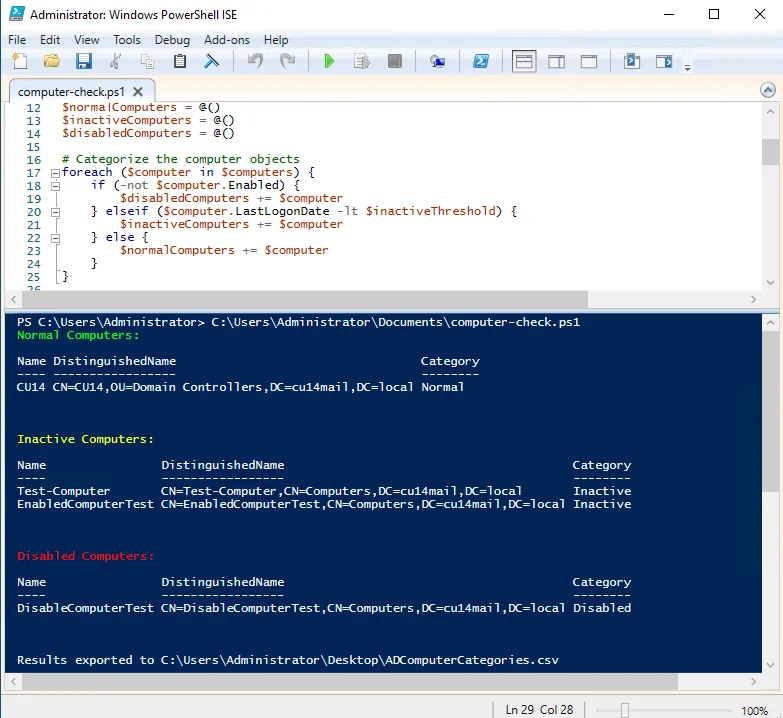
Legacy Techniques to Find Stale Computer Objects in AD
If you operate an older version of Windows Server, then the command line will suffice. It is similar to the one used to find locked out accounts in Active Directory setup.
Open CMD on your workstation and type
> dsquery computer -disabled
Or
> search-adaccount -accountinactive -computersonly

Another method is to use the Visual Basic script.
' This code finds disabled computer accounts in an AD domain.

' ------ SCRIPT CONFIGURATION ------
strDomainDN = "" ' To find disabled computers in Active Directory replace with your actual domain name in LDAP format
' ------ END CONFIGURATION ---------

strBase = "<LDAP://" & strDomainDN & ">;"
strFilter = "(&(objectclass=computer)(userAccountControl:1.2.840.113556.1.4.803:=2))" ' Filter for disabled accounts
strAttrs = "name;userAccountControl" ' Retrieve name and account control attribute

Const ADS_UF_ACCOUNTDISABLE As Integer = &H2 ' Flag for disabled account

Set objConn = CreateObject("ADODB.Connection")
objConn.Provider = "ADsDSOObject"
objConn.Open "Active Directory Provider"
Set objRS = objConn.Execute(strBase & strFilter & strAttrs & strScope)

objRS.MoveFirst
While Not objRS.EOF
If (objRS.Fields("userAccountControl").Value And ADS_UF_ACCOUNTDISABLE) = ADS_UF_ACCOUNTDISABLE Then
Wscript.Echo objRS.Fields(0).Value & " (Disabled)"
Else
Wscript.Echo objRS.Fields(0).Value & " (Enabled)"
End If
objRS.MoveNext
Wend

' Clean up
Set objRS = Nothing
Set objConn = Nothing
Count-AllDomainControllers
##########################################
# AUTHOR   : Ryan Mutschler
# DATE     : 8-15-2014
# EDIT     : 8-15-2014
# COMMENT  : Domain Controller Counter
# This script prompts for a list of domains and counts the number of domain controllers in each domain
# Compatible with all PowerShell versions
# Created with assistance from claude.ai
#
# VERSION  : 1    (Initial release)
##########################################


function Get-DomainControllers {
    param (
        [Parameter(Mandatory=$true)]
        [string]$DomainName
    )

    try {
        Write-Host "Searching for domain controllers in $DomainName..." -ForegroundColor Cyan

        # Use .NET DirectoryServices to query the domain
        $context = New-Object System.DirectoryServices.ActiveDirectory.DirectoryContext("Domain", $DomainName)
        $domain = [System.DirectoryServices.ActiveDirectory.Domain]::GetDomain($context)

        # Get all domain controllers
        $domainControllers = $domain.DomainControllers

        # Return the domain controllers
        return $domainControllers
    }
    catch [System.DirectoryServices.ActiveDirectory.ActiveDirectoryServerDownException] {
        Write-Host "Error: Cannot connect to domain $DomainName. The domain may not exist or is not accessible." -ForegroundColor Red
        return $null
    }
    catch {
        $errorMessage = $_.Exception.Message
        Write-Host ("Error occurred while querying domain " + $DomainName + ": " + $errorMessage) -ForegroundColor Red
        return $null
    }
}

function Main {
    Clear-Host
    Write-Host "=========================================" -ForegroundColor Green
    Write-Host "      Domain Controller Counter Tool     " -ForegroundColor Green
    Write-Host "=========================================" -ForegroundColor Green
    Write-Host ""

    # Prompt for domains
    Write-Host "Enter domain names (one per line). Press Enter on a blank line when finished:" -ForegroundColor Yellow
    $domainList = @()

    while ($true) {
        $domain = Read-Host
        if ([string]::IsNullOrWhiteSpace($domain)) {
            break
        }
        $domainList += $domain
    }

    # Validate that domains were entered
    if ($domainList.Count -eq 0) {
        Write-Host "No domains entered. Exiting script." -ForegroundColor Red
        return
    }

    Write-Host ""
    Write-Host "=========================================" -ForegroundColor Green
    Write-Host "       Domain Controller Results         " -ForegroundColor Green
    Write-Host "=========================================" -ForegroundColor Green

    # Create a result table
    $results = @()

    # Process each domain
    foreach ($domainName in $domainList) {
        $dcs = Get-DomainControllers -DomainName $domainName

        if ($null -ne $dcs) {
            $dcCount = $dcs.Count

            # Create result object
            $resultObj = New-Object PSObject -Property @{
                DomainName = $domainName
                DCCount = $dcCount
                Status = "Connected"
            }

            $results += $resultObj

            # Display domain controllers
            Write-Host ""
            Write-Host "Domain: $domainName - $dcCount Domain Controller(s) found" -ForegroundColor Green

            if ($dcCount -gt 0) {
                foreach ($dc in $dcs) {
                    Write-Host "  - $($dc.Name) (Site: $($dc.SiteName))" -ForegroundColor White
                }
            }
        }
        else {
            # Create result object for failed connection
            $resultObj = New-Object PSObject -Property @{
                DomainName = $domainName
                DCCount = 0
                Status = "Failed to connect"
            }

            $results += $resultObj
        }
    }

    # Display summary
    Write-Host ""
    Write-Host "=========================================" -ForegroundColor Green
    Write-Host "               Summary                   " -ForegroundColor Green
    Write-Host "=========================================" -ForegroundColor Green

    $format = "{0,-30} {1,-10} {2,-20}"
    Write-Host ($format -f "Domain", "DC Count", "Status") -ForegroundColor Yellow
    Write-Host ($format -f "------", "--------", "------") -ForegroundColor Yellow

    foreach ($result in $results) {
        $statusColor = if ($result.Status -eq "Connected") { "Green" } else { "Red" }
        Write-Host ($format -f $result.DomainName, $result.DCCount, $result.Status) -ForegroundColor $statusColor
    }

    Write-Host ""
    Write-Host "Script completed." -ForegroundColor Cyan
}

# Run the main function
Main
Count-MembersInADGroupNested
##########################################
# AUTHOR    : Ryan Mutschler
# DATE      : 4-2-2025
# EDIT      : 4-2-2025
# PURPOSE   : Count members of an Active Directory group, including nested groups.
# REPOSITORY: https://github.com/MutschlerHomeTech/Public-Scripts/blob/master/1.%20Full%20Scripts/Windows/File%20System/Create-WorkloadFolder.ps1
# WIKIPEDIA : https://wikipedia.mutschlerhome.com/books/windows-scripts/page/create-workloadfolder-v12
#
# VERSION   : 1.0     (Initial release)
##########################################

# Count-ADGroupMembers.ps1
# Script to count members of an Active Directory group, including nested groups

# Import the Active Directory module
Import-Module ActiveDirectory

function Get-ADNestedGroupMembers {
    param (
        [Parameter(Mandatory = $true)]
        [string]$GroupName
    )

    # Initialize a hashtable to track processed groups (prevents infinite loops with circular nesting)
    $processedGroups = @{}

    # Initialize a System.Collections.ArrayList to store all members (more efficient than arrays for adding items)
    $allMembers = New-Object System.Collections.ArrayList

    # Define a recursive function to get members including nested groups
    function Get-NestedMembers {
        param (
            [Parameter(Mandatory = $true)]
            [string]$GroupDistinguishedName
        )

        # Skip if we've already processed this group
        if ($processedGroups.ContainsKey($GroupDistinguishedName)) {
            return
        }

        # Mark this group as processed
        $processedGroups[$GroupDistinguishedName] = $true

        # Get direct members of the group
        $groupMembers = Get-ADGroupMember -Identity $GroupDistinguishedName -ErrorAction SilentlyContinue

        foreach ($member in $groupMembers) {
            # Add all members to our collection using ArrayList.Add() method
            [void]$allMembers.Add($member)

            # If the member is a group, process its members recursively
            if ($member.objectClass -eq 'group') {
                Get-NestedMembers -GroupDistinguishedName $member.distinguishedName
            }
        }
    }

    # Get the group's distinguished name
    try {
        $group = Get-ADGroup -Identity $GroupName -ErrorAction Stop
        $groupDN = $group.DistinguishedName
    }
    catch {
        Write-Error "Error finding group '$GroupName': $_"
        return $null
    }

    # Start the recursive process
    Get-NestedMembers -GroupDistinguishedName $groupDN

    # Return all unique members (remove duplicates)
    return $allMembers | Sort-Object -Property objectGUID -Unique
}

# Function to display counts by type
function Show-MemberTypeCounts {
    param (
        [Parameter(Mandatory = $true)]
        [array]$Members
    )

    $userCount = ($Members | Where-Object { $_.objectClass -eq 'user' }).Count
    $groupCount = ($Members | Where-Object { $_.objectClass -eq 'group' }).Count
    $computerCount = ($Members | Where-Object { $_.objectClass -eq 'computer' }).Count
    $otherCount = ($Members | Where-Object { $_.objectClass -notin 'user','group','computer' }).Count

    Write-Host "`nMembers by type:"
    Write-Host "  Users: $userCount"
    Write-Host "  Groups: $groupCount"
    Write-Host "  Computers: $computerCount"
    Write-Host "  Other objects: $otherCount"
}

# Main script
$groupName = Read-Host "Enter the name of the Active Directory group"

Write-Host "`nRetrieving members of group '$groupName' (including nested groups)..."
$members = Get-ADNestedGroupMembers -GroupName $groupName

if ($null -ne $members) {
    $totalCount = $members.Count
    Write-Host "`nTotal unique members: $totalCount"

    # Show breakdown by object type
    Show-MemberTypeCounts -Members $members

    # Optionally export to CSV
    $exportCsv = Read-Host "`nExport members to CSV? (Y/N)"
    if ($exportCsv -eq 'Y' -or $exportCsv -eq 'y') {
        # Ensure C:\Temp directory exists
        if (-not (Test-Path -Path "C:\Temp" -PathType Container)) {
            try {
                New-Item -Path "C:\Temp" -ItemType Directory -Force | Out-Null
                Write-Host "Created directory: C:\Temp"
            } catch {
                Write-Error "Failed to create C:\Temp directory: $_"
                return
            }
        }

        $csvPath = "C:\Temp\$groupName-members.csv"
        $members | Select-Object Name, SamAccountName, objectClass, distinguishedName |
            Export-Csv -Path $csvPath -NoTypeInformation
        Write-Host "Members exported to: $csvPath"
    }
}